
MagniLink ChromeViewer 4 – Enhance Chromebook Accessibility
Cara Install Ekstensi Chrome
- Klik tombol "Add to Chrome" di atas.
- Anda akan diarahkan ke Chrome Web Store.
- Klik "Add to Chrome" pada halaman ekstensi.
- Konfirmasi dengan klik "Add Extension" pada popup.
- Ekstensi akan otomatis terpasang dan ikon muncul di toolbar.
- Klik ikon ekstensi di toolbar untuk mulai menggunakan.
Screenshot
In today’s fast-paced digital environment, accessibility is not just a feature—it is a necessity. For students, professionals, and individuals with visual impairments in the United States, finding the right tools to bridge the gap between physical documents and digital clarity is essential. MagniLink ChromeViewer 4 serves as a powerful bridge, specifically engineered to transform your Chromebook into a high-performance visual aid, ensuring that you never miss a detail, whether you are reading textbooks, professional documents, or personal correspondence.
Designed by LVI, a global leader in low-vision technology, this software offers unparalleled control over your reading experience. By connecting seamlessly with MagniLink camera systems, it provides a stable, high-definition interface that adapts to your unique vision needs. Whether you are in a classroom setting or working from home, MagniLink ChromeViewer 4 empowers you to regain your independence and increase your productivity through advanced image processing and intuitive controls, all optimized for the ChromeOS ecosystem.
Key Features
- Full integration with LVI MagniLink camera systems for crisp, high-resolution imagery.
- Customizable magnification levels to suit various reading requirements.
- Multiple artificial color modes to enhance contrast and reduce eye strain.
- Adjustable brightness settings for optimal viewing in any lighting condition.
- User-friendly interface specifically optimized for Chromebook touchscreens and trackpads.
- Seamless software updates for improved performance and hardware compatibility.
- Advanced hardware support for modern MagniLink MLS, PRO, ZIP, and MLV systems.
- Personalized adjustment options to save your preferred viewing configurations.
How to Use
- Ensure your LVI MagniLink camera is connected to your Chromebook via the appropriate port.
- Launch the MagniLink ChromeViewer 4 application from your Chrome app launcher.
- Select your connected camera device from the software’s settings menu to initialize the video feed.
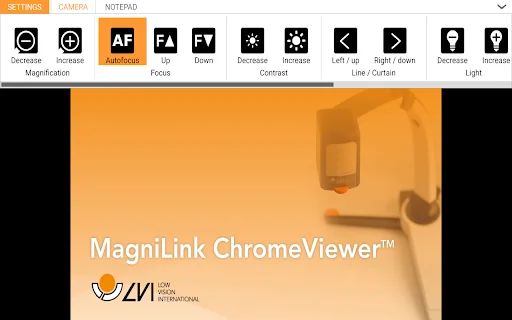
- Use the on-screen control panel to adjust magnification, brightness, and color modes to your preference.
- Place your document under the camera and begin reading in real-time with the enhanced display.
FAQ
Is MagniLink ChromeViewer 4 compatible with all Chromebooks?
It is compatible with most modern Chromebooks that support external USB cameras and meet the system requirements for the software.
Which camera models are supported?
The software supports MagniLink MLS, PRO, ZIP, and MLV systems manufactured after specific dates in 2021 and 2022. Older models may require a firmware upgrade.
Do I need to update my camera firmware?
If your camera was manufactured before the specified dates (November 2021 for MLS/PRO, January 2022 for ZIP/MLV), a firmware update is required. Please contact your local dealer for assistance.
Can I change the color mode to reduce glare?
Yes, the software offers several artificial color modes designed to improve contrast and reduce glare, making text easier to read for users with light sensitivity.
Is this software free to use?
MagniLink ChromeViewer 4 is provided as a professional tool for LVI camera users; please check the official LVI Global website for licensing and distribution details.
Empower your vision and transform the way you interact with the world around you. Experience the precision and reliability of professional-grade low-vision technology right on your Chromebook. Download MagniLink ChromeViewer 4 today and take the first step toward a clearer, more accessible digital experience.
There are currently no user reviews available for MagniLink ChromeViewer 4.
| ID Ekstensi | iahcdnagehlkjglmjndkgklajknknabb |
|---|---|
| Version | 4.1.8.8 |
| Size | 13.7 MB |
| Developer | https://lviglobal.se/ |
| Terakhir Diperbarui | |
| Tanggal Rilis | |
| Jumlah Pengguna | 2.000++ |
| Chrome Store Ranking | #23976 |
| Category | Accessibility |
| Tipe | Free |

Zoom Text Only ডাউনলোড করুন – ইমেজ ছাড়াই টেক্সট জুম করুন
http://www.lihanli.com/

YouTube Live-এর জন্য Chat Filter ডাউনলোড করুন – সেরা মেসেজ ফিল্টারিং টুল
https://fiahfy.blogspot.com

Elementique Senior – প্রবীণদের জন্য সহজ ফোন ও ভিডিও কল অ্যাপ
Elementique

Dyslexia Friendly ডাউনলোড করুন – ডিসলেক্সিয়া সহায়ক সেরা ব্রাউজার এক্সটেনশন
https://dyslexiafriendly.dev

Color Contrast Checker ডাউনলোড করুন – সেরা অ্যাক্সেসিবিলিটি টুল
https://pivotalaccessibility.com

toMono ডাউনলোড করুন – YouTube অডিও ব্যালেন্স ঠিক করুন
Mihai Pop