

TwinScroll: Sync Scrolling for Side-by-Side Tabs – Productivity Tool
Featuredfumyparli
Cara Install Ekstensi Chrome
- Klik tombol "Add to Chrome" di atas.
- Anda akan diarahkan ke Chrome Web Store.
- Klik "Add to Chrome" pada halaman ekstensi.
- Konfirmasi dengan klik "Add Extension" pada popup.
- Ekstensi akan otomatis terpasang dan ikon muncul di toolbar.
- Klik ikon ekstensi di toolbar untuk mulai menggunakan.
Screenshot
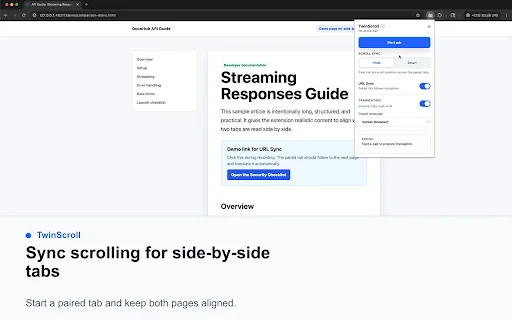
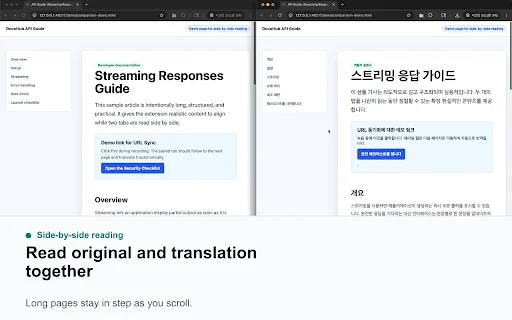
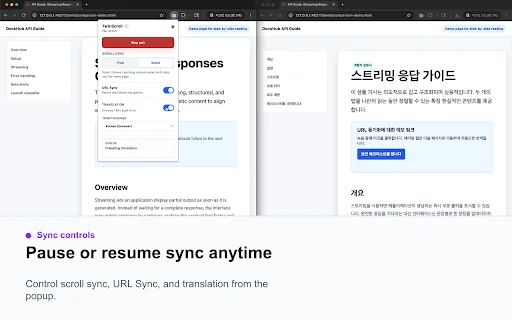
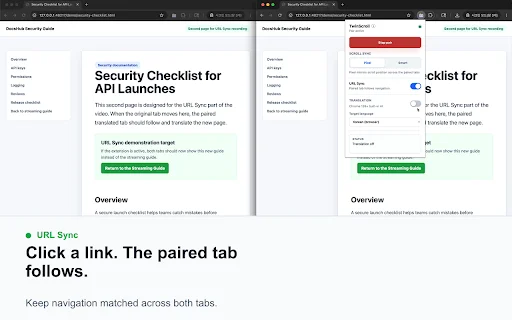
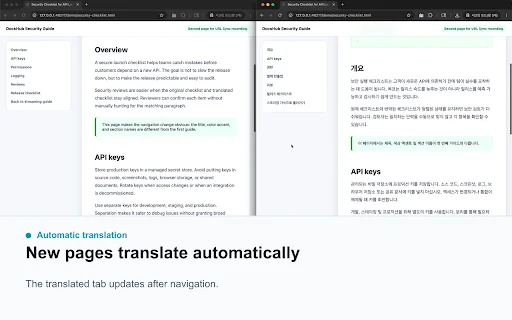
Are you tired of manually dragging two scrollbars just to compare documents, articles, or technical specifications? In today’s fast-paced digital environment, professionals often need to view multiple web pages simultaneously. TwinScroll, the ultimate Chrome extension, eliminates the frustration of redundant scrolling by locking your tabs together in perfect harmony.
Whether you are a developer reviewing API documentation, a student comparing translations, or a researcher analyzing long-form reports, TwinScroll streamlines your workflow. Stop wasting time switching back and forth between tabs and start working with maximum efficiency. With its intuitive sync modes, TwinScroll ensures that your content stays perfectly aligned, allowing you to focus on the task at hand rather than the mechanics of navigation.
Key Features
- Synchronized Scrolling: Effortlessly sync two tabs to move in tandem, saving time on manual adjustments.
- Pixel vs. Smart Mode: Choose between direct pixel mirroring or Smart mode, which aligns content based on layout matching.
- URL Synchronization: Navigate one tab and have the second follow, perfect for browsing connected documentation.
- Translation Support: Ideal for comparing original language content with Chrome’s built-in translations side by side.
- Customizable Comparison: Toggle URL sync off to compare two completely different websites or local documentation files.
- Seamless Workflow: Designed specifically for those reading technical specs, tutorials, and long-form web content.
- Lightweight Performance: Built to be fast and unobtrusive, ensuring your browser remains responsive while multitasking.
How to Use
- Install the TwinScroll extension from the Chrome Web Store and pin it to your toolbar.
- Open two tabs in your browser and place them side by side on your screen.
- Click the TwinScroll icon to activate the extension for the active pair of tabs.
- Select your preferred scroll mode (Pixel or Smart) in the extension settings.
- Start scrolling one page and watch as the second page follows your movement automatically.
FAQ
Does TwinScroll work with different websites?
Yes, by turning off URL Sync, you can scroll two completely different websites or pages side by side.
Can I use this for translation comparison?
Absolutely. TwinScroll is excellent for keeping an original document on one side and a translated version on the other.
What is the difference between Pixel and Smart mode?
Pixel mode mirrors the exact scroll bar position, while Smart mode attempts to align content based on the page layout, which is helpful if one page is longer than the other.
Does it support local files?
Currently, the extension is optimized for web URLs; please ensure your browser settings allow extensions to access file URLs if you intend to test local files.
Is this extension free to use?
Yes, TwinScroll is available as a free productivity tool for all Chrome users to enhance their multitasking experience.
Ready to supercharge your productivity and end the headache of manual scrolling? Download TwinScroll today and experience a smarter way to browse, compare, and translate content across your tabs!
TwinScroll is highly valued for its efficient synchronized scrolling, though users are looking for better support for local files and cross-URL comparison functionality.
Kelebihan
- Effective synchronization for same-URL pages
- Extremely useful for application demonstrations
- Simplifies comparing side-by-side content
- Reduces inconvenience when reviewing translations
- Great for comparing reports and similar website structures
Kekurangan
- Lack of support for local file URLs
- Limited synchronization between two different URLs
- Users desire more robust cross-page comparison features
Ulasan Pengguna
After Update no sync between inkognito & normal...
not scroling two simple windows. The same windows only:(((
Looks like it works for https:// urls, but it does not support opened html pages (the url will start with file://). I need to compare 2 big downloaded reports. Was very disappointed :(
| ID Ekstensi | kdhkfpcbdfdifbpfdoghkgfhclhfjpkk |
|---|---|
| Version | 1.1.0 |
| Size | 5.4 MB |
| Developer | fumyparli |
| Terakhir Diperbarui | |
| Tanggal Rilis | |
| Jumlah Pengguna | 1.000++ |
| Jumlah Ulasan | 12 |
| Chrome Store Ranking | #27462 |
| Category | Productivity |
| Tipe | Free |
| Status | Featured Extension |

Fontiran ডাউনলোড করুন – পার্সিয়ান ফন্টের স্টাইল উন্নত করুন
https://fontiran.com/

PickPack Driver ডাউনলোড করুন – ড্রাইভারদের দক্ষতা বাড়ান
PickPack

Zooper Driver অ্যাপ ডাউনলোড করুন – কর্পোরেট পরিবহন ও ক্যাব সার্ভিস
Zooper

Memory Saver ডাউনলোড করুন – Chrome এর র্যাম বাঁচান
IeraciSoft

QuickAnimate for Google Slides™ ডাউনলোড করুন – দ্রুত অ্যানিমেশন যোগ করুন
https://slidesai.io

NZBDonkey ডাউনলোড করুন – সেরা NZB ফাইল অটোমেশন টুল
Tensai